How to Export Perplexity Threads with Sources to PDF & Markdown (2026 Guide)
A Perplexity answer without its citations is a rumor with good formatting. The numbered references and the Sources list on the right side are what separate a Perplexity thread from a generic chatbot reply — and they’re exactly what every copy-paste and print workaround quietly throws away. Perplexity offers **no native export** for a single thread. This guide covers every realistic way to get a Perplexity thread out of the app with its sources intact.
Why Perplexity is a special case for exporters
Perplexity isn’t ChatGPT. Three things make its threads harder (and more important) to preserve:
- Sources are the value. Every answer links to numbered citations and a Sources panel. Researchers and journalists don’t save Perplexity threads to re-read the prose — they save them to retrace where the answer came from.
- No per-thread export. Perplexity’s official data route is an account-level export. It’s overkill when you need one thread from this morning.
- Research workflows live on it. Spaces, follow-up chains, and deep research-style threads accumulate into the closest thing many people have to a working research log. When the thread disappears — and accounts do get switched, cleaned, or logged out — the notes go with it.
If you export once a year, you can tolerate the official route. If Perplexity is your daily research tool, you want the thread on disk, formatted, with sources.
The 4 ways to export a Perplexity thread (honest comparison)
| Method | Setup | Output quality | Sources preserved | Best for |
|---|---|---|---|---|
| Browser Print (Ctrl+P) | None | Poor to fair — threads cut off, citations as plain numbers | Partial, disconnected | Quick one-offs |
| Copy-paste → editor | None | Poor — citation numbers lose links, Sources panel lost | No | Text snippets only |
| Perplexity account export | Slow, account-level | JSON/CSV of everything, not a readable document | Data included | Full-account backup |
| Chrome extension | 1 click | Excellent — full thread, paginated, citations and Sources list intact | Yes | Regular research use |
The extension route is the only method that produces a document that still looks like research — citations anchored to a Sources list at the end.
Method 1: Browser Print (works, but loses the sources)
- Open the thread on perplexity.ai.
- Press Ctrl+P (Windows) or Cmd+P (Mac).
- Destination → Save as PDF.
- Disable Headers and footers; enable Background graphics to keep Perplexity’s styling.
The catch: Perplexity virtualizes long threads, so printing captures only the messages currently rendered — older answers vanish from the PDF. Numbered citations stay in the text but lose their clickable links, and the Sources panel often doesn’t print at all.
When to use it: a single short answer, no follow-ups, no sources you need to cite. Otherwise, skip it.
Method 2: Copy-paste into a document editor
Select the thread, copy, paste into Word or Google Docs. For a one-answer Q&A this is fine. The moment you have a follow-up chain, the citations collapse into bare numbers with nothing behind them, and the Sources list is gone.
Method 3: Perplexity’s account export (full backup only)
Perplexity lets you request your data from Settings → Account. It produces an account-level dump of your history in JSON/CSV — complete, but machine-readable, batch-only, and delivered slowly. It’s the right tool for a one-time archive of your entire account; the wrong tool for "I need this thread as a readable PDF for the report by noon."
Method 4: Export with a Chrome extension (recommended)
A dedicated exporter reads the full thread from Perplexity’s backend and renders it into the format you choose — pagination included, so you don’t lose the older answers that print cuts off.
Step 1 — Install. Search for XWX AI Chat Exporter in the Chrome Web Store and click Add to Chrome. No account, no signup.

Steps 2–4: Open the thread, pick a format, export part of it if needed
Step 2 — Open the Perplexity thread. Go to perplexity.ai and open the conversation you want to save. The extension detects Perplexity automatically — no mode switching.
Pick PDF or Markdown
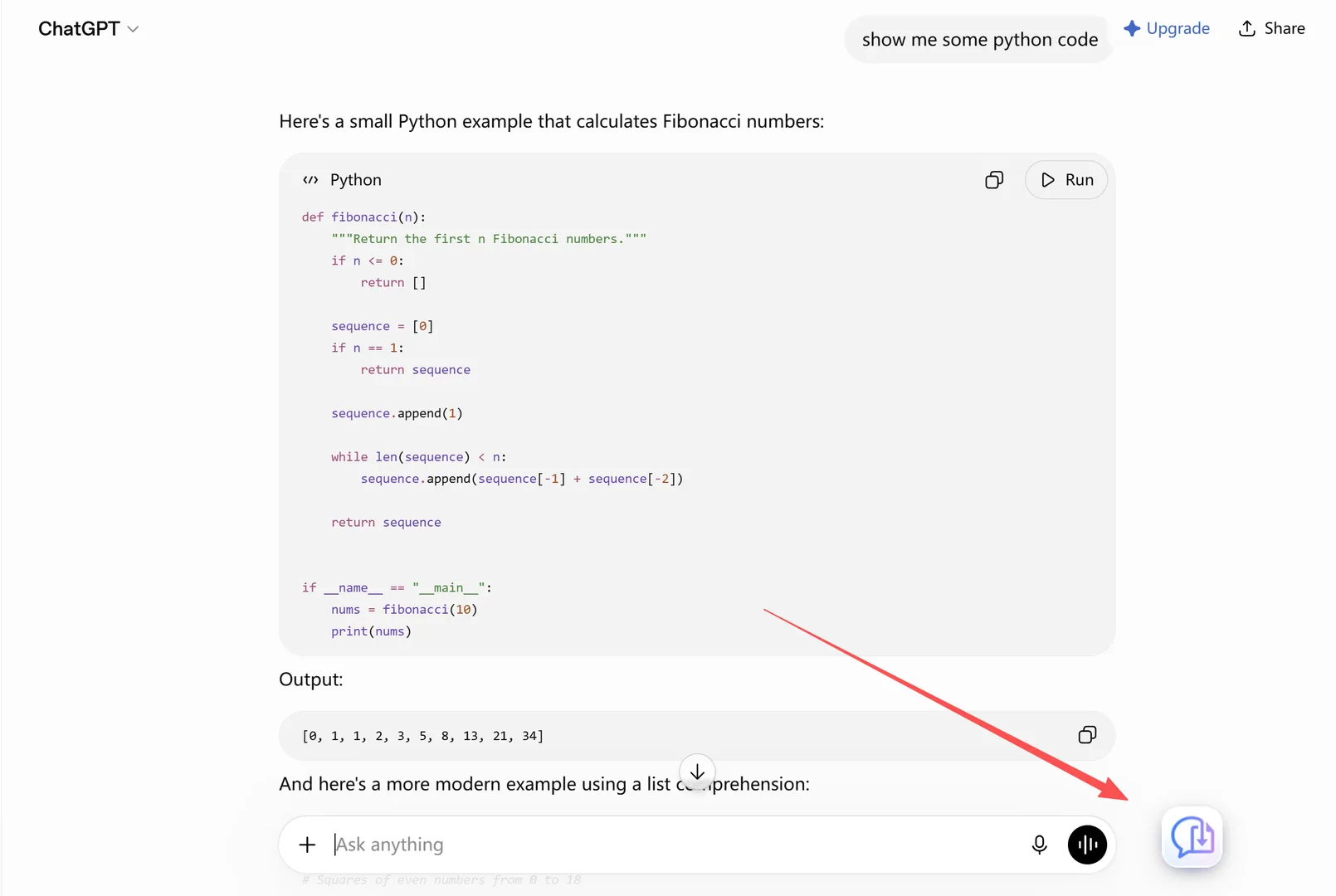
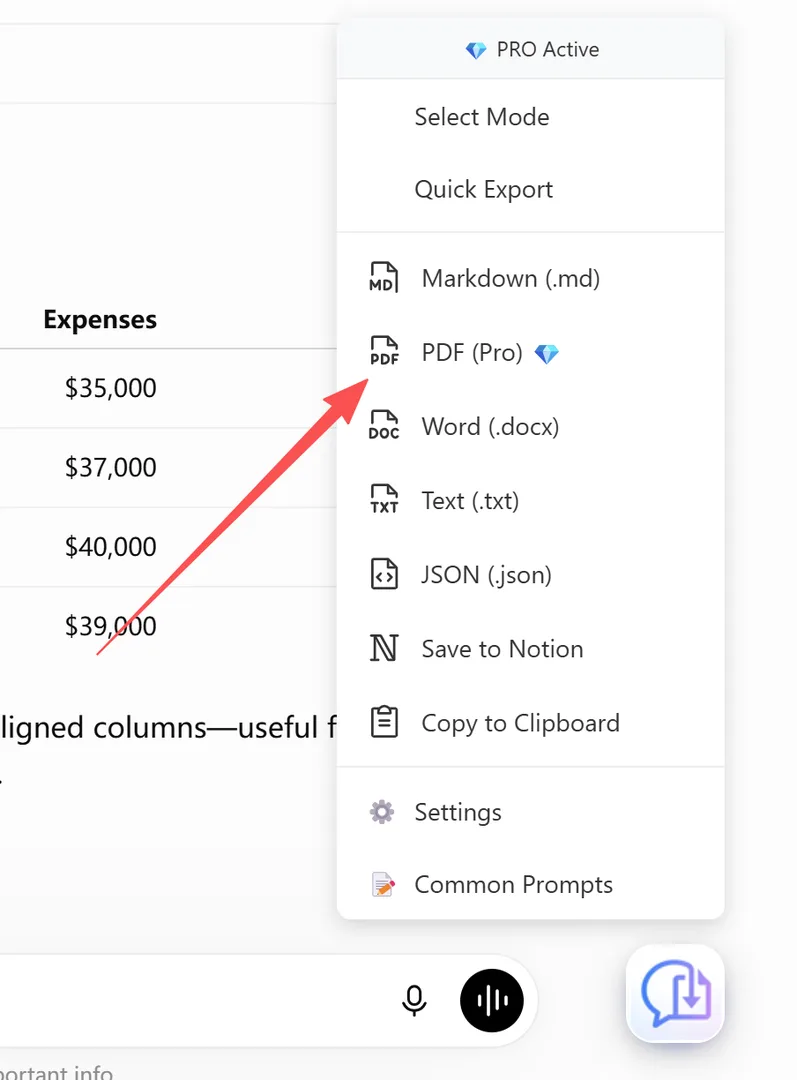
Step 3 — Pick PDF or Markdown. Click the floating button and choose your format.
- PDF produces a share-ready research document with the numbered citations and a Sources list intact, code and math rendered properly.
- Markdown produces a
.mdfile with YAML frontmatter (title, model, timestamp, word count, source URL) — ready for Obsidian, Notion, or a research log.
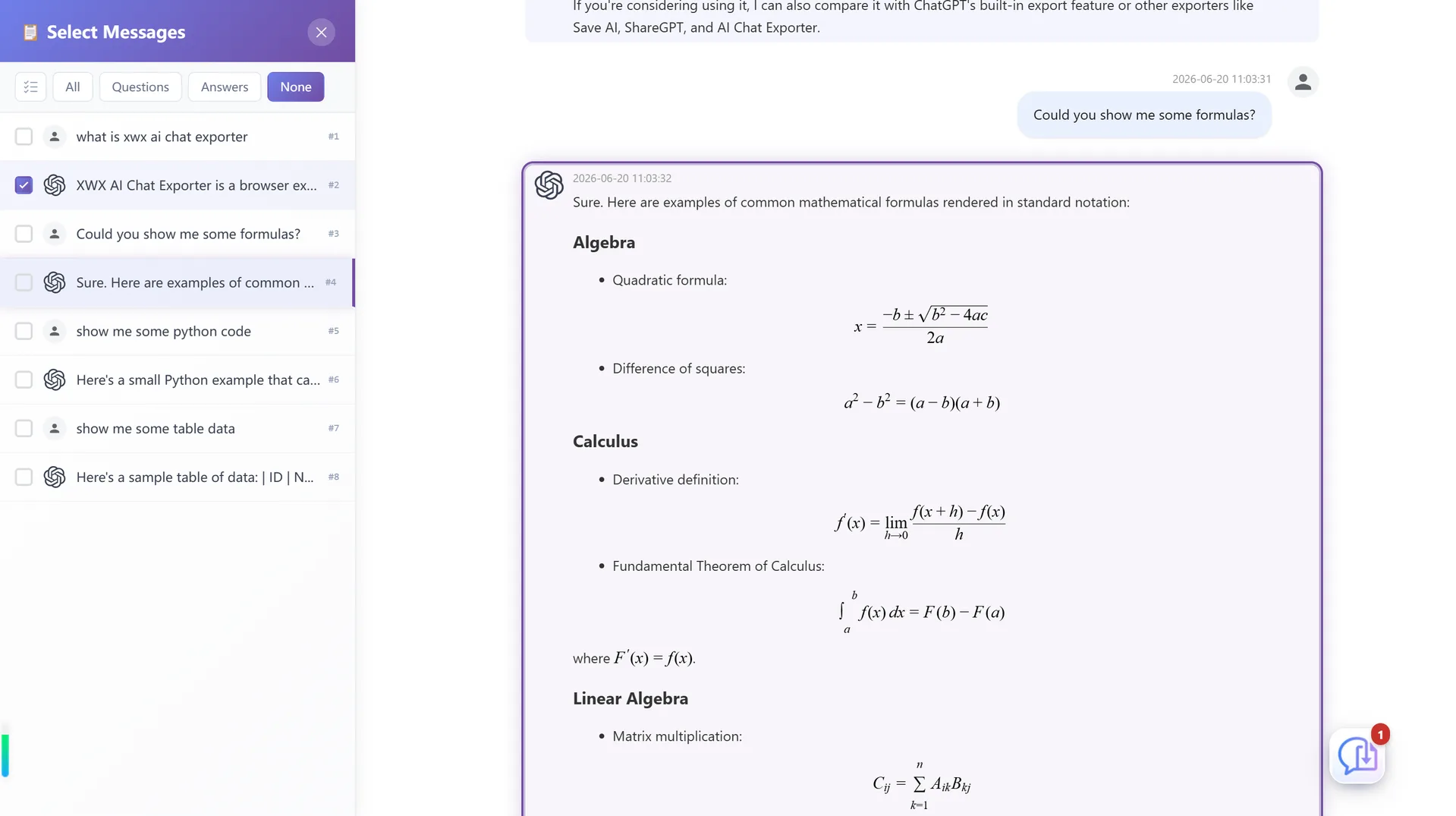
Step 4 — (Optional) Export only part of the thread. Use Smart Selection to select exactly which messages go into the file, with both panels staying in sync.
What survives a Perplexity export (and what doesn’t)
| Content type | Browser Print | XWX export |
|---|---|---|
| Numbered citations in the answer | Numbers kept, links lost | Numbered + traceable to Sources list |
| Sources list (right-hand panel) | Usually doesn’t print | Included with the document |
| Follow-up answers in long threads | Cut off by virtualization | Complete, paginated |
| Code blocks with syntax highlighting | Highlight lost | Preserved |
| LaTeX math | May render as raw text | Rendered properly |
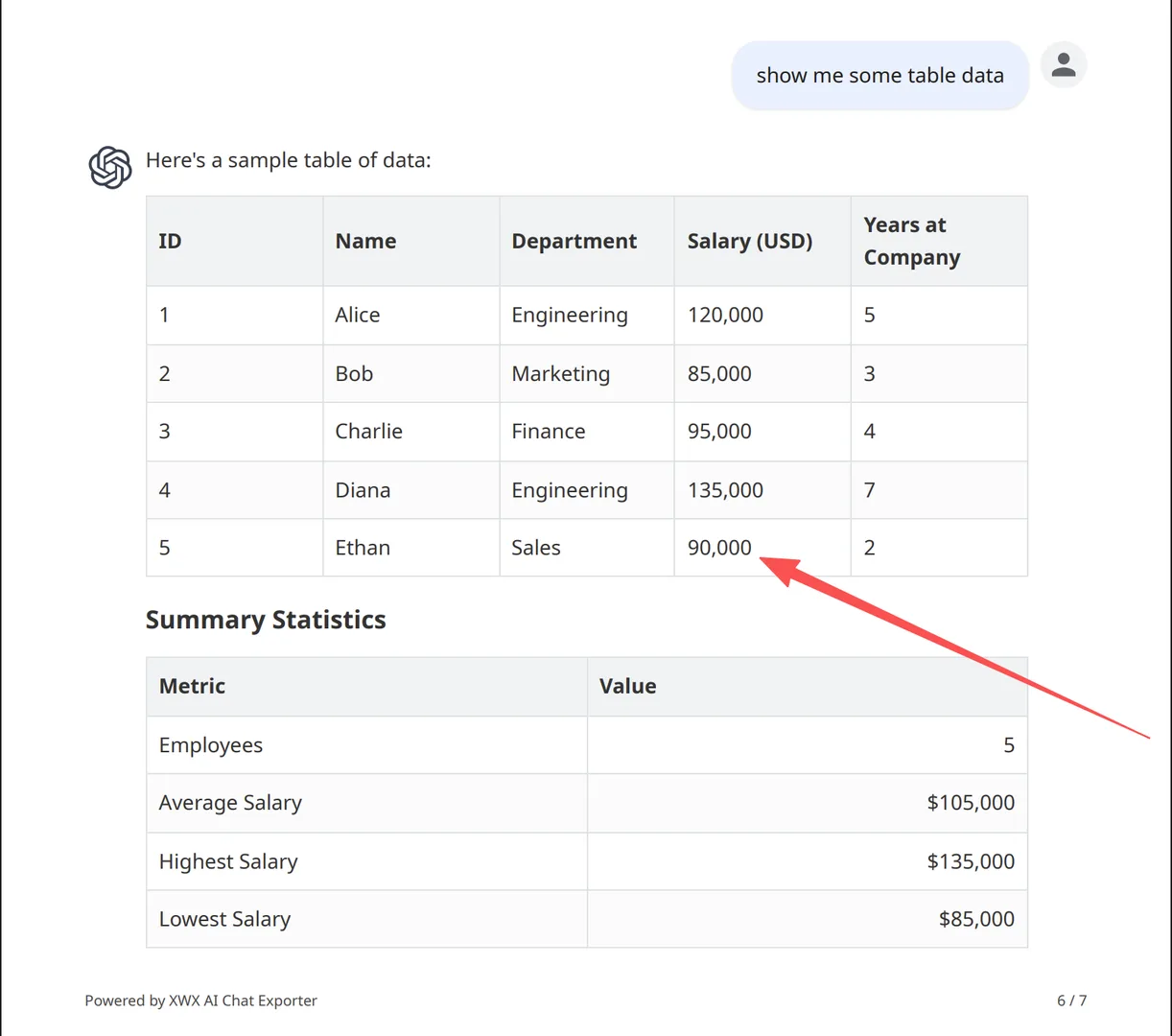
| Tables | Wrapped / misaligned | Intact |
| Spaces / saved threads | N/A | Exported like any thread |
| Model name & timestamp | Not included | Included as metadata |
The realistic limitations
- PDF exports go through a render server so the layout engine stays consistent; content is deleted immediately after generation and never stored. Markdown, TXT, and JSON never leave your machine.
- Sources depend on the link being alive. The export records the sources Perplexity showed you. If an external URL is later taken down, the citation stays but the link may go dead — that’s the nature of web sources, not a flaw in the export.
- Images require the source to be downloadable. If a host blocks it, the export falls back to the image URL or a placeholder.
- Spaces and shared threads export the same way as regular threads; XWX supports Perplexity at perplexity.ai.
Who actually exports Perplexity threads
- Researchers — keeping a runnable record of every source a deep-research thread consulted, so the provenance of an answer survives the thread being deleted.
- Analysts & consultants — turning Perplexity-assisted research into source-backed PDFs for client decks and internal reviews.
- Journalists & writers — archiving citation trails for fact-checking later.
- Students — saving source-linked research threads as PDFs they can actually cite.
- PKM users — dropping Markdown exports into Obsidian, where the YAML frontmatter and the Sources list make every thread searchable.
Alternatives to PDF (and when to choose them)
- Markdown — the format for a research log. Obsidian, Notion, and Logseq ingest it directly. See Export AI Conversations to Obsidian.
- Word (.docx) — when you need to annotate, edit, or fold the thread into a report. See Export AI Chats to Word.
- Notion — pushes the thread into your Notion workspace as a structured page. See Sync AI Chats to Notion.
- JSON — full structured data if you want to script over your research history.
Perguntas frequentes
Can you export a Perplexity conversation?+
Not natively — Perplexity has no per-thread download button. The account-level export gives you everything as JSON/CSV. A browser extension like XWX AI Chat Exporter adds a one-click PDF or Markdown export to any thread.
Does Perplexity let you download a chat?+
Perplexity offers an account-level data export under Settings, but there’s no built-in way to download a single thread as a readable file. Extensions fill that gap.
How do I export Perplexity to PDF?+
Install XWX AI Chat Exporter, open the thread on perplexity.ai, click the floating export button, and choose PDF. Numbered citations and the Sources list are preserved, and long threads export completely.
Does exporting Perplexity keep the sources/citations?+
Yes with a proper exporter. XWX keeps the numbered citations in the answers and includes the Sources list in the document — this is exactly what browser print loses.
Can I export a Perplexity Space?+
Yes. Spaces contain threads, and XWX exports any thread you open the same way as a regular conversation, with sources intact.
Is it free to export Perplexity threads?+
Markdown, TXT, JSON, and clipboard exports are free with no limits. PDF and Word include a free daily quota; Pro removes limits and adds AI-generated tags and summaries.
Exporte seus chats de IA
Extensão gratuita do Chrome. Sem conta. Funciona em 13 plataformas de IA.